


Change the quantity small counter to a nice large dropdown.
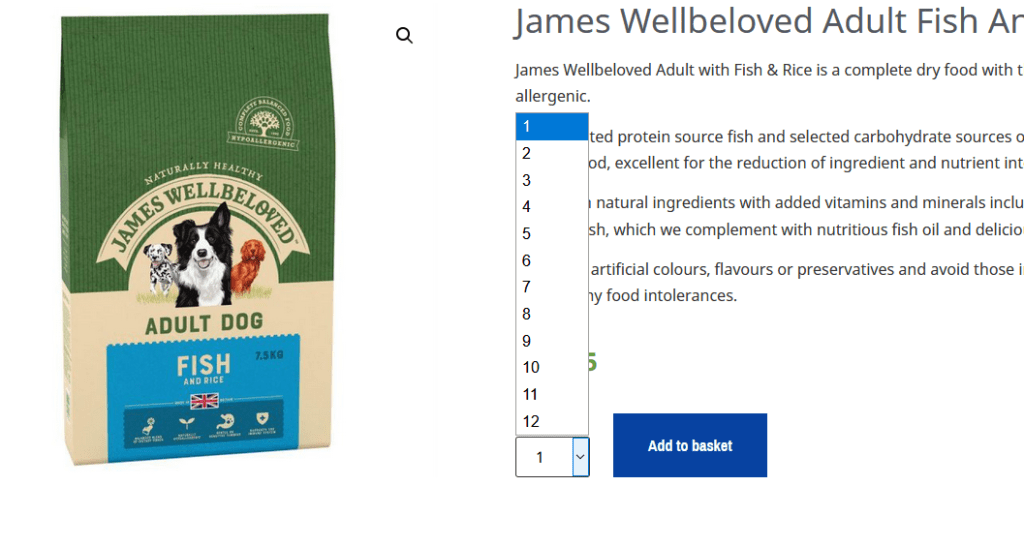
function woocommerce_quantity_input( $args = array(), $product = null, $echo = true ) {
if ( is_null( $product ) ) {
$product = $GLOBALS['product'];
}
$defaults = array(
'input_id' => uniqid( 'quantity_' ),
'input_name' => 'quantity',
'input_value' => '1',
'classes' => apply_filters( 'woocommerce_quantity_input_classes', array( 'input-text', 'qty', 'text' ), $product ),
'max_value' => apply_filters( 'woocommerce_quantity_input_max', -1, $product ),
'min_value' => apply_filters( 'woocommerce_quantity_input_min', 0, $product ),
'step' => apply_filters( 'woocommerce_quantity_input_step', 1, $product ),
'pattern' => apply_filters( 'woocommerce_quantity_input_pattern', has_filter( 'woocommerce_stock_amount', 'intval' ) ? '[0-9]*' : '' ),
'inputmode' => apply_filters( 'woocommerce_quantity_input_inputmode', has_filter( 'woocommerce_stock_amount', 'intval' ) ? 'numeric' : '' ),
'product_name' => $product ? $product->get_title() : '',
);
$args = apply_filters( 'woocommerce_quantity_input_args', wp_parse_args( $args, $defaults ), $product );
// Apply sanity to min/max args - min cannot be lower than 0.
$args['min_value'] = max( $args['min_value'], 0 );
// Note: change 20 to whatever you like
$args['max_value'] = 0 < $args['max_value'] ? $args['max_value'] : 12;
// Max cannot be lower than min if defined.
if ( '' !== $args['max_value'] && $args['max_value'] < $args['min_value'] ) {
$args['max_value'] = $args['min_value'];
}
$options = '';
for ( $count = $args['min_value']; $count <= $args['max_value']; $count = $count + $args['step'] ) {
// Cart item quantity defined?
if ( '' !== $args['input_value'] && $args['input_value'] >= 1 && $count == $args['input_value'] ) {
$selected = 'selected';
} else $selected = '';
$options .= '';
}
$string = '
';
if ( $echo ) {
echo $string;
} else {
return $string;
}
}
Great thanks to https://www.businessbloomer.com/woocommerce-change-add-cart-quantity-drop/